
An electronic directory of slot car tracks. Data can be created and maintained either through this web page or directly via its REST API.
The information model is deliberately track-centric: the track is the primary record, not the club, raceway, or facility that hosts it. Locations, clubs, and organizations exist only as things a track can link out to.
A track's own identity — direction of travel, length, lane count, topology (the order and length of corners, straights, and esses), and wiring, including its resistance losses — is largely fixed. Running a race on it only makes subtle, temporary changes: lane voltage and current, lane-switching order for that heat. That's why those live under Event as overrides, not on the track itself.
The same flexibility extends to where a track lives and who runs it. A Location carries no notion of being a club, a raceway, or a facility — any number of tracks can share one, and what it "is" falls out of Track.owner instead: a Club, an Organization, or, for a bare venue with no club behind it, just a plain URL. A track can also have no fixed location at all, for a venue that genuinely changes from one occasion to the next, and an Event can override where a track is for that occasion. The 2023 ISRA Worlds ran on a portable track, the Askari Circuit, set up inside Resorts Casino Hotel in Atlantic City; it was later given a permanent home at SpeedZone NJ in Mount Holly, New Jersey — so the track lives at SpeedZone, and the 2023 Worlds is an Event overriding its location with the hotel. A Worlds whose track isn't known yet stays on a single ISRA World Championship Track with no standard location, each year's venue an Event override. The UK Slot Car Festival at Gaydon works the same way: a biannual show that often sets up several plastic demonstration tracks built solely for that event, each recorded as its own Event override rather than a permanent Track with a standard location.
Got an idea, a correction, or a track to add? Talk to us and other racers on the AART Discord — it's where improvements get discussed and updates are announced. Tracks have their own channel, #tracks.
Click a track for its full record — lanes, rotation, standard location/owner, and its events.
Know a track that's missing, or spotted something wrong? Tell us in #tracks on Discord.
Locations
Clubs
Organizations
Series
Classes
Admin
Visible only to AART-affiliated accounts. Approve or reject new registrations, and enable or disable existing users.
Pending registrations
All users
Account
Reading data is always open. Creating, editing, or deleting anything requires signing in.
API guide
This page is just a client of its own REST API — there's no separate admin backend. Anything you
can do here, you can do with curl or any HTTP client.
Reading is always open — no credentials needed for any GET.
Writing requires a token — every POST/PUT/DELETE
needs an Authorization: Bearer <token> header. Get a token by registering or
logging in, or mint a standing personal API token from the Account tab once you're signed in.
This guide uses curl throughout — don't have it, or want to use
something already built into your OS instead? See
making REST calls without extra installs, by platform (PowerShell,
wget, the browser console, and more).
Base URL
The live API is at https://slotcar-admin.a10y.workers.dev — every example below
uses it. Running the worker locally (wrangler dev)? Swap in
http://localhost:8787 instead.
List tracks (no auth needed)
curl https://slotcar-admin.a10y.workers.dev/api/tracksGet a token
Register once, or log in any time after that — both return a token. A personal API token created from the Account tab works exactly the same way and doesn't expire until you revoke it.
curl -X POST https://slotcar-admin.a10y.workers.dev/api/auth/register \
  -H "Content-Type: application/json" \
  -d '{
    "name": "Ada Lovelace",
    "email": "ada@example.com",
    "password": "a long unique passphrase",
    "affiliation": "Analytical Engine Racing Team"
  }'
# -> { "user": {...}, "token": "..." }
Upload (create) a track
A plain POST of a JSON document shaped like a track record — this is the only way
to create a track; there's no upload form on this site, by design (see "2. Add a new track" further
down in the fully worked example for a form that builds this exact curl command for
you). The server assigns id; leave it out of what you send.
curl -X POST https://slotcar-admin.a10y.workers.dev/api/tracks \
  -H "Content-Type: application/json" \
  -H "Authorization: Bearer <your token>" \
  -d '{
    "name": "Example Raceway",
    "description": "4-lane home track in the garage",
    "direction": "cw",
    "surface": "MDF",
    "lanes": [
      { "id": "red",  "name": "Red",  "order": 1, "voltage": 12, "maxCurrent": 40, "powerSupply": "DC" },
      { "id": "blue", "name": "Blue", "order": 2, "voltage": 12, "maxCurrent": 40, "powerSupply": "DC" }
    ]
  }'
Or from a file, same as uploading through the form:
curl -X POST https://slotcar-admin.a10y.workers.dev/api/tracks \
  -H "Content-Type: application/json" \
  -H "Authorization: Bearer <your token>" \
  -d @my-track.json
Update or delete a track
curl -X PUT https://slotcar-admin.a10y.workers.dev/api/tracks/12 \
  -H "Content-Type: application/json" \
  -H "Authorization: Bearer <your token>" \
  -d @my-track.json

curl -X DELETE https://slotcar-admin.a10y.workers.dev/api/tracks/12 \
  -H "Authorization: Bearer <your token>"
Upload a track's files: SVG, CAD, 3D models
However you have a track described — an SVG, a CAD drawing, a 3D model — attach it to the track
as a file. The track record keeps a list of them in files, each downloadable exactly as
uploaded. Send the raw file with --data-binary (plain -d strips newlines)
and say what it is with ?format=: svg, dxf,
dwg, step, iges, stl, pdf,
csv or json. ?name= (the filename to download it as) and
?source= (where it came from) are optional but worth filling in.
curl -X POST "https://slotcar-admin.a10y.workers.dev/api/tracks/12/files?format=dxf&name=riverside.dxf&source=CAD%20original" \
  -H "Content-Type: application/octet-stream" \
  -H "Authorization: Bearer <your token>" \
  --data-binary @riverside.dxf
# -> { "id": 12, ..., "files": [ { "id": 1, "url": "https://slotcar-admin.a10y.workers.dev/api/tracks/12/files/1", "format": "dxf", ... } ] }
An SVG also becomes the diagram shown for the track in the directory (its svgfile)
— add &display=false to attach one without changing that:
curl -X POST "https://slotcar-admin.a10y.workers.dev/api/tracks/12/files?format=svg&name=riverside.svg" \
  -H "Content-Type: image/svg+xml" \
  -H "Authorization: Bearer <your token>" \
  --data-binary @riverside.svg
Download any file from its url (no token needed), or remove it:
curl -L -o riverside.dxf https://slotcar-admin.a10y.workers.dev/api/tracks/12/files/1

curl -X DELETE https://slotcar-admin.a10y.workers.dev/api/tracks/12/files/1 \
  -H "Authorization: Bearer <your token>"
Upload a track's lane geometry: raw (x, y, z) points
The one form this site can actually compute with — each lane's path as an ordered list of
points, z optional (for banking and bridges). Every laneId must be one of
the track's own lane ids. Points are stored separately from the track record, which keeps just a
summary — point count and computed lane length per lane.
curl -X PUT https://slotcar-admin.a10y.workers.dev/api/tracks/12/geometry \
  -H "Content-Type: application/json" \
  -H "Authorization: Bearer <your token>" \
  -d '{
    "units": "mm",
    "source": "hand-traced",
    "lanes": [
      { "laneId": "red",  "closed": true, "points": [[0, 0, 0], [3000, 0, 0], [3000, 1200, 0], [0, 1200, 0]] },
      { "laneId": "blue", "closed": true, "points": [[0, 100, 0], [3000, 100, 0], [3000, 1100, 0], [0, 1100, 0]] }
    ]
  }'
# -> { "id": 12, ..., "geometry": { "url": ".../api/tracks/12/geometry", "units": "mm",
#      "lanes": [ { "laneId": "red", "closed": true, "points": 4, "length": 8400 }, ... ] } }
Or straight from a spreadsheet as CSV — one lane,x,y,z row per point, in order,
with units and source in the query string:
curl -X PUT "https://slotcar-admin.a10y.workers.dev/api/tracks/12/geometry?units=mm&source=hand-traced" \
  -H "Content-Type: text/csv" \
  -H "Authorization: Bearer <your token>" \
  --data-binary @riverside-lanes.csv
Download it back as JSON or CSV (no token needed):
curl -o riverside.json https://slotcar-admin.a10y.workers.dev/api/tracks/12/geometry
curl -o riverside.csv "https://slotcar-admin.a10y.workers.dev/api/tracks/12/geometry?format=csv"
The same GET/POST/PUT/DELETE pattern works for every resource: locations, clubs,
organizations, series, classes, events, and documents — just swap tracks in the path.
GET never needs a token; POST/PUT/DELETE always do.
Fully worked example: a track, its location, and an event
Everything above in one pass — list and create a track, list and create a location and link it
to the track, then list and create an event and link it to the track too. All the writes below
reuse the token from "Get a token" above. Note that PUT replaces the whole
record, so linking something after the fact means fetching the current record, adding the
one field that changed, and sending the whole thing back — the examples below use
jq to do that inline.
Each step also has an editable copy of its command underneath, under "Customize this
call" — change a field and the command updates as you type. Writes always show Authorization:
Bearer <YOUR_TOKEN> as a placeholder, never a real token; "Download curl script" saves
it as a .sh file so you can fill in your own token and run it.
1. List all tracks
curl https://slotcar-admin.a10y.workers.dev/api/tracks
# -> [ { "id": 1, "name": "Bolton Slot Car Track" }, { "id": 2, "name": "Castle Raceway" }, ... ]
2. Add a new track
curl -X POST https://slotcar-admin.a10y.workers.dev/api/tracks \
  -H "Content-Type: application/json" \
  -H "Authorization: Bearer <your token>" \
  -d '{
    "name": "Riverside Raceway",
    "description": "8-lane commercial track",
    "direction": "cw",
    "surface": "Routed",
    "lanes": [
      { "id": "red",  "name": "Red",  "order": 1, "voltage": 12, "maxCurrent": 40, "powerSupply": "DC" },
      { "id": "blue", "name": "Blue", "order": 2, "voltage": 12, "maxCurrent": 40, "powerSupply": "DC" }
    ]
  }'
# -> { "id": 42, "name": "Riverside Raceway", ... }
The server assigns the id — 42 here. Everything below threads that id
through.
3. List all locations
curl https://slotcar-admin.a10y.workers.dev/api/locations
# -> [ { "id": 1, "name": "Bolton" }, { "id": 2, "name": "Castle Raceway" }, ... ]
4. Create a new location
curl -X POST https://slotcar-admin.a10y.workers.dev/api/locations \
  -H "Content-Type: application/json" \
  -H "Authorization: Bearer <your token>" \
  -d '{
    "name": "Riverside Hobby Center",
    "country": "USA",
    "city": "Springfield",
    "state": "IL",
    "address": "400 River Rd",
    "postcode": "62701"
  }'
# -> { "id": 20, "name": "Riverside Hobby Center", ... }
5. Add the location to the track
Track.location is always { url }, pointing at the location's own
GET endpoint — fetch the track, set that one field, put the whole thing back:
curl https://slotcar-admin.a10y.workers.dev/api/tracks/42 \
  | jq '.location = { "url": "https://slotcar-admin.a10y.workers.dev/api/locations/20" }' \
  > track.json

curl -X PUT https://slotcar-admin.a10y.workers.dev/api/tracks/42 \
  -H "Content-Type: application/json" \
  -H "Authorization: Bearer <your token>" \
  -d @track.json
# -> { "id": 42, "name": "Riverside Raceway", "location": { "url": ".../api/locations/20" }, ... }
6. List all events
curl https://slotcar-admin.a10y.workers.dev/api/events
# -> [ { "id": 1, "name": "1/32 BSCRA Nationals 2026" }, ... ]
7. Create a new event
An event only makes sense once it's pointed at a track, but nothing stops creating it first —
same pattern as the location above, just with the link the other way round
(Event.trackId, not a nested { url }):
curl -X POST https://slotcar-admin.a10y.workers.dev/api/events \
  -H "Content-Type: application/json" \
  -H "Authorization: Bearer <your token>" \
  -d '{
    "trackId": null,
    "type": "race",
    "name": "Riverside Season Opener",
    "date": { "start": "2026-10-03", "end": "2026-10-03" }
  }'
# -> { "id": 15, "trackId": null, "name": "Riverside Season Opener", ... }
8. Add the event to the track
curl https://slotcar-admin.a10y.workers.dev/api/events/15 \
  | jq '.trackId = 42' \
  > event.json

curl -X PUT https://slotcar-admin.a10y.workers.dev/api/events/15 \
  -H "Content-Type: application/json" \
  -H "Authorization: Bearer <your token>" \
  -d @event.json
# -> { "id": 15, "trackId": 42, "name": "Riverside Season Opener", ... }
Confirm it stuck: curl https://slotcar-admin.a10y.workers.dev/api/tracks/42/download
returns the track as a file; curl https://slotcar-admin.a10y.workers.dev/api/events/15 now shows
"trackId": 42.
Roadmap
This directory is the foundation. Here's where it's headed.
Precise geometry
A track's identity must be entered manually, unless you have a description of the track in which
case it shall be possible to upload it to this site. So far the best-documented track is Bolton,
because it was recently built and designed in CAD — that CAD documentation was converted to SVG file
format to be able to display and accurately represent it digitally. A separate open-source
slot
car track mapper — hardware we're building in the open — will let anyone capture a track's real
topology (segment-by-segment: straights, corners, esses), slot depth and width, and wiring —
precisely, turning mapped: true into a genuine trust signal rather than an aspiration.
It's still early days — contributions and feedback on the hardware/firmware are welcome over there.
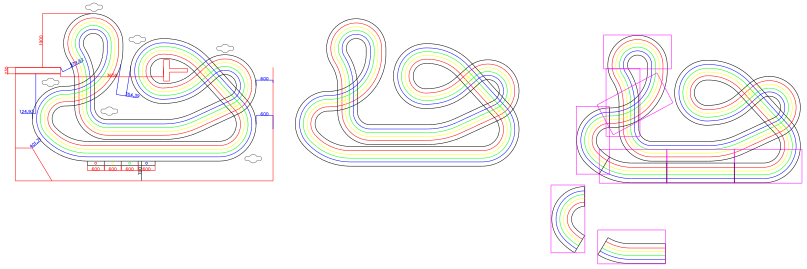
The target level of accuracy: a real track traced lane-by-lane (red, blue, yellow,
black), corner and straight geometry included — not a rough sketch. This is what
mapped: true and a real svgfile/geometry should look like.
Track designs and CAD files are supplied by Martin Ellis.
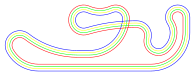
Bolton's own layout, traced lane-by-lane from its CAD cutting plan — the file
behind the Bolton track record's svgfile.
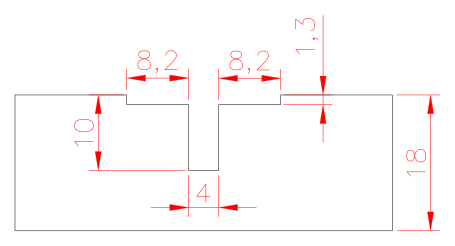
And the slot itself, from the same CAD source: 4 mm wide and 10 mm deep, with an 8.2 mm by 1.3 mm recess for the braid either side, routed into 18 mm board — the kind of detail the mapping device will capture too.
Building a plastic (Scalextric/Carrera/Ninco/Scaleauto/Policar) layout in the
meantime? Race Track
Lab is a free, web-based designer that validates circuit closure and lane length as you go —
a good way to nail down a layout before it becomes a Track record here. For a routed
wood track, our own track designer (a work in progress) does the same:
lay out the centreline, see every lane's length, and let auto-close finish the loop.
Sim racing, bridged to reality
Competitive slot car racing today still means owning a track, or driving to one — a real cost of
entry. A professional, high-fidelity simulator — accurate physics, not an arcade approximation —
would let anyone race competitively without either, but only if it's driven by real data rather than
guesswork: precise track topology, per-lane voltage/current/power supply, standard lane rotation.
That's the actual reason this directory cares about mapped: true and lane-level
electrical detail beyond documentation — accurate enough data is the bridge that lets a driver move
seamlessly between racing a track virtually and racing the same track for real.
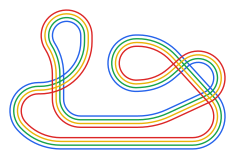
A tiny proof of concept: the same traced lane geometry from above, this time driving four cars around it — one per lane, each slowing for corners and accelerating out of them, each on its own lap pace so they drift apart and back together exactly like a real race. No physics engine here, just the real track shape with a speed curve derived from its own corners and straights.
Lap-by-lap performance
Pairing that geometry with real per-lap timing data opens up giving racers concrete feedback for tuning their cars — not just "you were slower," but where on the track, and what changed.
Broadcast-ready insight
More international events are streamed live on YouTube and Twitch. Once technical and performance data is captured consistently, it can be presented the way an F1 broadcast does — live technical overlays that make watching more involving, not just a fixed camera on the track. A separate open-source slot car data logger — another device we've been developing — is aimed at exactly this: capturing real-time and logged performance data, starting with the power delivered to the car, so those overlays are built on real numbers rather than guesswork.
AI-assisted optimization
With enough race data gathered consistently, there's an opening for AI to suggest optimizations from what happened during a race — car setup, lane strategy — rather than leaving drivers to work it out by feel alone.
A searchable database
The natural progression from there is collecting richer data about events, cars, drivers, and controllers — growing this from a track directory into a searchable performance database.
Have your say
What gets built next is shaped by the people using it. Suggest features, report problems, and follow progress on the AART Discord.